$ kognitcapture --mode agentic// MCP server online · scoped tools · every agent read and write audited
Reading as Everyone
Intelligent document capture · Self-hosted · Made in Europe
Capture every page. Pay for none of them.Invoices in. Checked data out.A queue your team can actually clear.One JAR. One database. Your infrastructure.API-first capture. Script it, extend it, embed it.The documents never leave the building.Capture that costs the same when you grow.Many clients. Your brand. One installation.
KognitCapture is a multi-tenant, self-hosted capture platform that replaces ABBYY FlexiCapture, ABBYY Vantage, Kofax / Tungsten, ChronoScan, Rossum and Ephesoft — with no per-page meter, no station licences and no module unlocks. Your documents stay on your hardware. Your bill stops moving when your volume grows.
Paper, PDF and structured e-invoices come in through one intake. Line items are extracted per supplier layout, rules check totals and master data, and reviewers only see the invoices that need a decision. The fee does not depend on how many invoices you process.
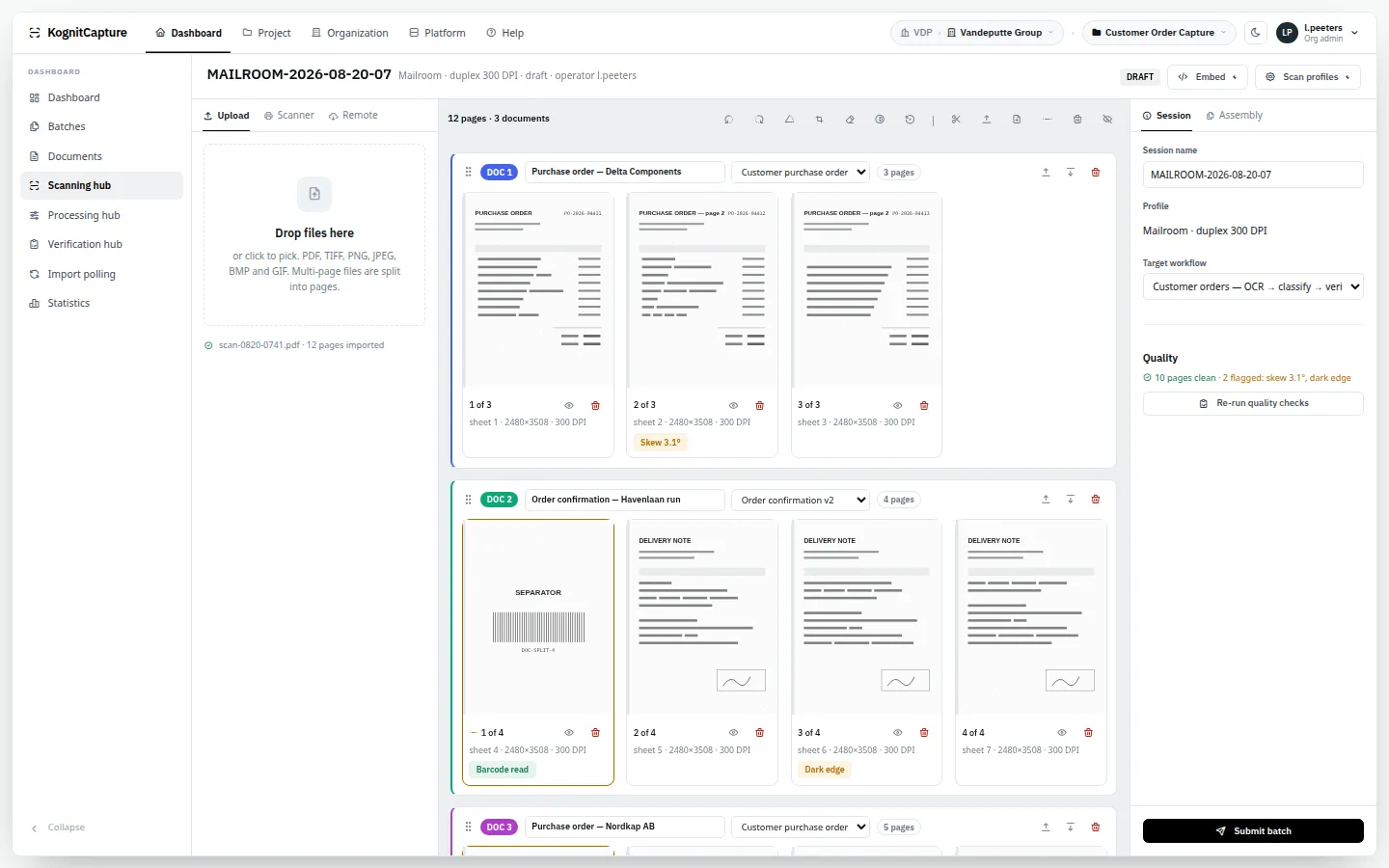
A scan desk in the browser that flags bad pages while the paper is still in hand. Review queues ordered by deadline. Keyboard-first verification with the page beside the fields, and locking so no two people open the same document. Nothing to install on any desk.
A single Java application on Linux with PostgreSQL. OCR and models run in-process — no external recognition service, no licence server, no message broker. Scale by adding nodes and telling each what it does. Air-gapped operation is a documented deployment.
An OpenAPI 3 specification generated from the running code. One call to capture a document. Template versions you can pin. Scripts in JavaScript, Groovy and Java, a plugin SDK with five extension points, embeddable review screens. And an MCP server with more than a hundred tools.
Recognition runs inside your installation. Remote AI is opt-in per organisation and per step. Access is role-based with per-project grants; every field keeps its history; retention is set per project. And we list plainly what the product does not do.
Licensed per installation by your turnover band, from €900 a year: unlimited users, projects and pages, increases capped at 25%. No runtime licence gate. Blueprints create a working project in one step instead of a quarter of consulting. Your data stays in your database.
Tenants, organisations and projects keep clients apart, down to the directory tree. Name, logo, colours, domain and mail provider are set per client. The review and scan screens embed in your own product. Your connectors ship as plugins.
83Capabilities benchmarked against nine capture platforms
1Installation serves every tenant you onboard
Runs on Linux and PostgreSQL. Browser-only operator hubs — nothing installed on a desk. Tesseract, local GGUF models or fifteen named LLM providers, switchable per project and per step.
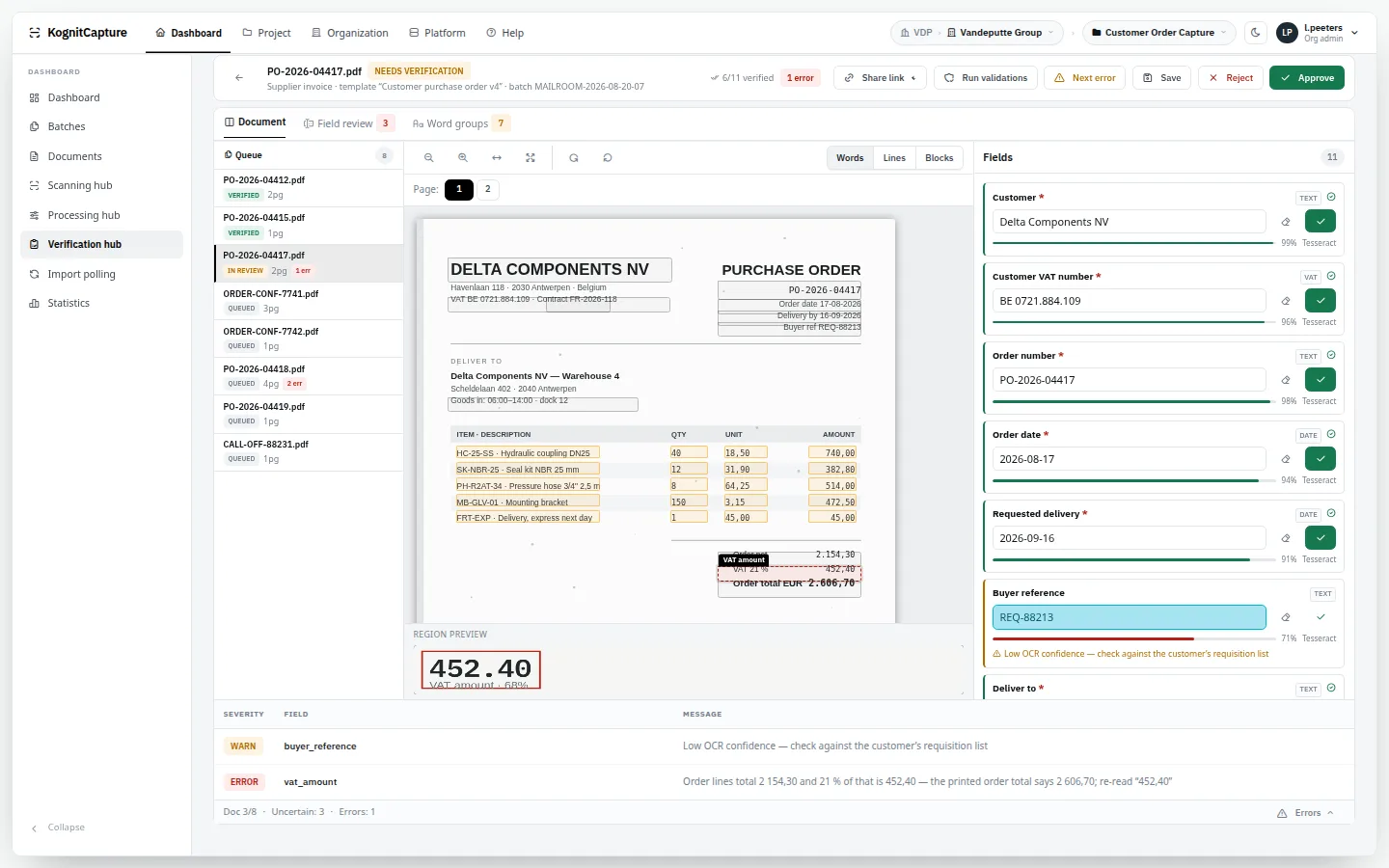
The verification hub. Page beside fields, confidence per field, and the rule that stopped this document. Synthetic data.Open the live demo →
customer_nameDelta Components NV99%
po_numberPO-2026-0441798%
order_date2026-08-1794%
order_lines5 rows · 4 columns92%
vat_amount452,4068% → review
Who is reading?
Pick a role · the site puts your answers first
For everyone
Four things to know before anything else.
01It runs on your infrastructure. There is no KognitCapture cloud in the data path.
02It is not metered. One annual fee per installation; pages, users and projects are unlimited.
03It covers the whole process. Intake, reading, extraction, validation, human review and delivery in one product.
04It is honest about limits. No vendor certification, no SSO yet, no named ERP connectors — said up front.
For finance & accounts payable
Fewer touches per invoice, and proof for every number.
01One intake for paper, PDF and e-invoices. Peppol, Factur-X, ZUGFeRD and XRechnung documents are mapped onto the same template as scans.
02Line items per supplier layout. One template, many layout alternatives, one field set downstream.
03Rules that catch errors before booking. Arithmetic on totals and VAT, lookups in supplier master data, cross-check of XML against the page.
04A trail for the auditor. Recognised value, every correction, who verified it and when — per field.
Document capture is priced by the page and delivered by the quarter.
The established platforms in this category tend to share two properties. They meter you per page, so the more value you extract, the more you pay. And configuring a single document type is a specialist consulting project. The cloud alternatives remove the installation — and require your invoices, claim forms and identity documents to leave your building, which for a growing number of organisations ends the conversation.
01
Page meters
Volume growth becomes a cost problem instead of an efficiency gain.
02
Forced migrations
A vendor retires the platform you built on and hands you a rebuild project.
03
Data egress
Cloud capture means regulated documents go to somebody else's tenancy.
04
Consulting dependency
Every new document type is a change request, not a configuration.
The answer
One platform, on your hardware, with the economics inverted.
01
No runtime licence gate
No licence server, no entitlement check, no page counter. With local OCR and local models, the marginal cost of a page is the electricity to process it.
02
Blueprints, not projects
Industry starter kits create a whole working project — workflow, steps, routing and a fully fielded template — in one step.
03
Nothing has to leave
OCR and local models run inside the installation. Air-gapped operation is a supported deployment. Remote model providers are an option, never a requirement.
The AI problem
Cloud AI is priced by the token and reads every page you send it.
Language models read documents that classic OCR cannot. But the usual way to get one is somebody else's API: each page becomes a request to a third party, each request is billed by the token, and the model behind the endpoint can be changed or retired on the provider's schedule, not yours. For invoices, claim files and identity documents, that is a meter and a data transfer in one.
A language model reads the invoices and forms that classic OCR struggles with. Bought as a cloud service, it brings back the two things you were trying to leave: a bill that grows with every page, and documents that leave the company to be read. A budget you cannot predict, for a process you cannot fully audit.
A cloud language model is a data transfer. Every page a step sends becomes a request to a third party, under that party's retention and sub-processor terms, in a region you may not choose. KognitCapture does not redact personal data before a model call — so the only complete answer for sensitive material is a model that runs where the documents already are.
KognitCapture treats the model as a component you choose, not a service you are tied to. It can run inside your installation.
01
Token meters
The page meter comes back under another name. Cost follows volume and prompt length, and is hard to budget.
02
Pages leave the building
Each call ships the document to a provider. Sovereignty and confidentiality rules often end the idea there.
03
Models change under you
A provider can update or withdraw a model version. Extraction you tested last quarter may behave differently next quarter.
04
No connection, no AI
An air-gapped or restricted network cannot call an API at all, so the capability simply is not available.
The answer
Run the model next to the documents. Rent one only when you decide to.
Local first, remote by choice, and the same workflow either way: switching a step from a local model to a provider — or back — is a setting, not a rebuild.
Text models in GGUF format run in the application process; vision models run in a local model server the platform manages on the same host. No page leaves, and it works with no internet at all.
02
Hardware instead of tokens
A local model costs memory and compute you own, not a fee per page. As a guide, three 7-billion-parameter models at 4-bit quantisation need roughly 12 to 15 GB outside the Java heap.
03
Your own model server counts too
Point a step at Ollama, vLLM, LM Studio, LocalAI or any OpenAI-compatible endpoint in your own data centre. The pages stay on your network.
04
You pin the model
A model file you installed does not change until you replace it. Models load on first use, are evicted when idle and stay inside a memory budget.
05
Remote when it earns its place
Fifteen named providers behind one interface, with priority and failover. Chosen per organisation and per workflow step, with the pages sent to it scoped by you.
06
A ceiling on the spend
Every call is logged with cost and latency. One monthly ceiling per organisation warns or blocks, so a remote model cannot run away with the budget.
Honest limits: a local model is slower than a large hosted one on the same page unless you give it a GPU, and smaller models read difficult documents less well. AI is optional at every stage — Tesseract, native PDF text, rules and in-process machine learning need no language model at all.
What is usually extra is included here
How the three approaches typically differ
The two right-hand columns describe typical characteristics of a product category, not any specific vendor. Check the product you are comparing against. For reported prices of ABBYY, Kofax / Tungsten, Rossum and Amazon Textract at your page volume, see the pricing page.
Question
KognitCapture
Classic capture suite
Cloud capture API
How is it priced?
Annual fee per installation, by turnover
Usually per page or per volume band
Per page or per call
Where are documents processed?
On your infrastructure
On your infrastructure
In the provider's cloud
Runs without internet?
Yes, documented air-gapped install
Often, with a licence server
No
Human review screens
Included, in the browser, embeddable
Included, often a desktop client
You build them
Workflow and routing
Included, visual designer
Included
You build it
Scanning
Browser scan desk, driverless network scanners
Desktop scan station, TWAIN / ISIS
Not part of the service
AI models
Local or any of 15 providers, your choice per step
Vendor's own engines
Provider's own models
API coverage
Everything the interface does
Varies; often partial
Recognition only
New document type
Blueprint or visual template designer
Often a consulting engagement
Prompt or pre-built model
Access for AI agents
MCP server, OAuth 2.1, audited
Rare
Rare
Vendor security attestation
None — runs under your controls
Often available
Usually available
Named ERP connectors
None — generic REST, database, file, bus
Often available
Rare
TWAIN / ISIS scanner drivers
Not supported
Supported
Not applicable
Switching from — pick the platform you are replacing
Each page is a straight read: where that product genuinely beats us, where we beat it, and what the move actually costs. We publish both columns, because a comparison that only lists strengths is worth nothing to you in an evaluation.
Four arguments the incumbents cannot answer at once
Why buyers move
Unit economics
Your bill stops scaling with your volume
Metered platforms charge roughly $0.02–0.10 a page (public list bands). At two million pages that is a page bill on top of a platform fee. Here recognition runs on your own CPU with Tesseract or a local model: the marginal cost of the next page is the electricity to read it. Use a remote LLM if you want to — tokens are logged and costed per tenant, and you decide which projects may call out at all.
Sovereignty
Documents never leave your estate
Self-hosted on Linux and PostgreSQL, air-gap capable, with local GGUF models for both text and vision. Tenant → organisation → project isolation reaches down to the storage prefix, and every agent, API key and operator action lands in an audit channel. There is no licence server to phone home to, because there is no licence gate.
Operations
Nothing installed on an operator's desk
Scanning, processing and verification hubs are browser pages. Network scanners are driven server-side over eSCL, so a scanning desk needs a browser and nothing else — no thick client, no driver rollout, no per-station licence. The hubs also embed into your own application behind an API key, which is how software vendors ship capture without building it.
Multi-tenancy
One install, every client you onboard
FlexiCapture, ReadSoft and ChronoScan expect one deployment per customer. This platform was built tenanted: a service provider runs twenty clients on one cluster, with per-client storage, roles, retention, AI budgets and audit. That is the single strongest number in any business case a service provider puts together.
Timing
ABBYY is moving FlexiCapture accounts to Vantage. That is a rebuild, not a transfer.
There is no converter that turns a FlexiCapture document definition into a Vantage skill — practitioners describe the path as inventory, map, rebuild, re-integrate, run in parallel, and such deployments are commonly quoted at eight to twelve weeks.
If you have to rebuild anyway, the honest question is no longer "replace something that works" but "rebuild there, or rebuild here". Here, an importer reads your FlexiCapture 12 project and gives you a head start.
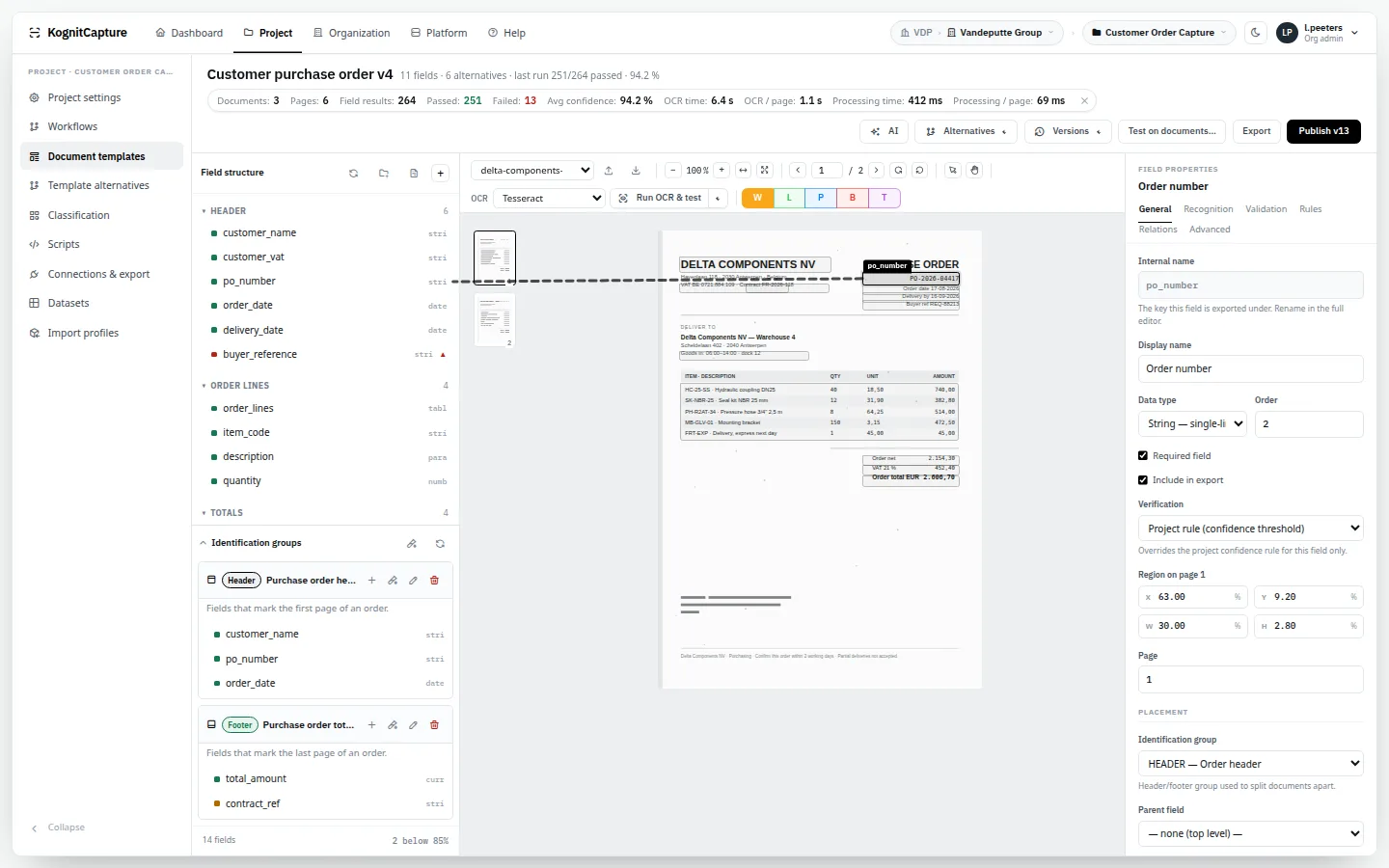
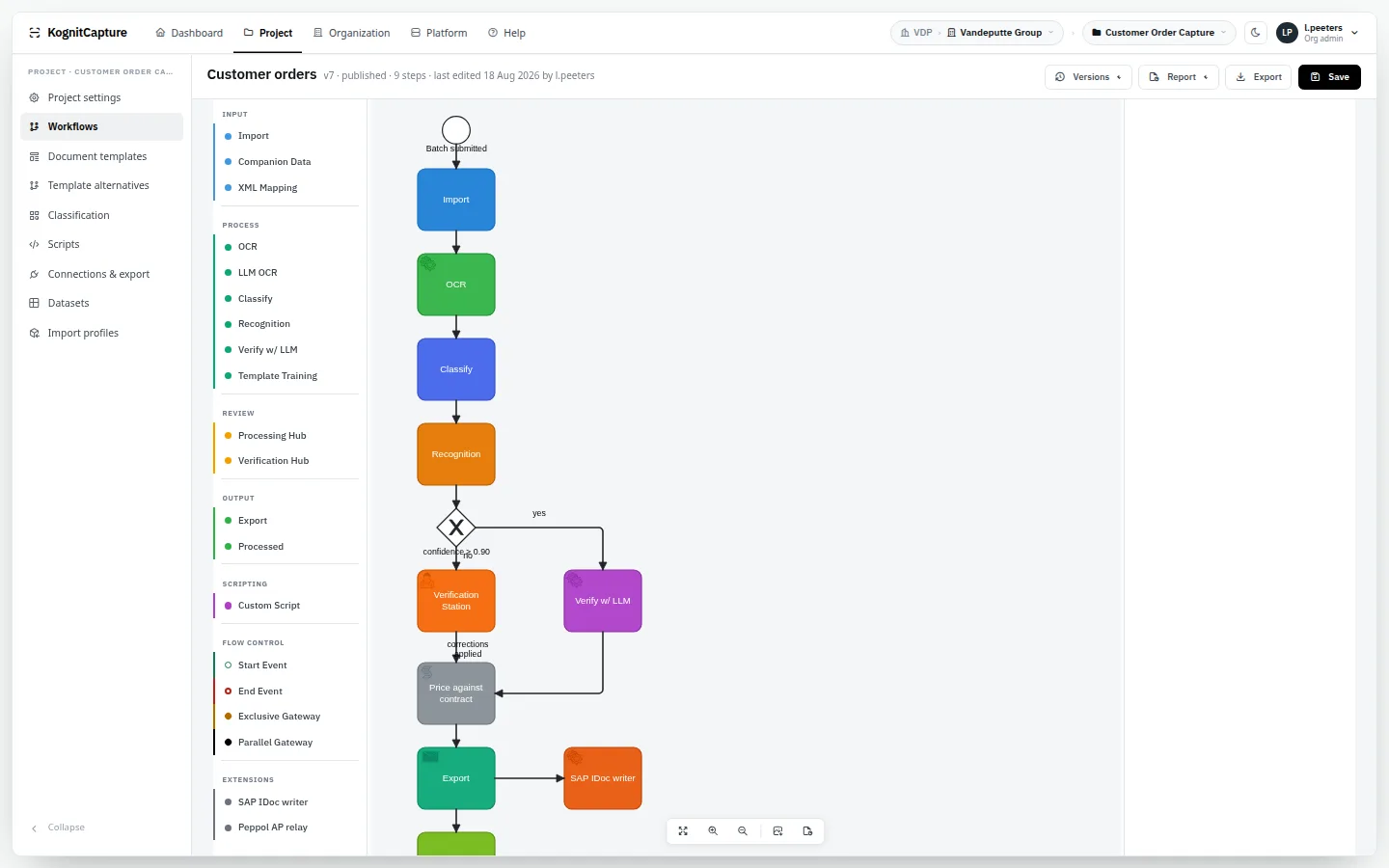
Project configuration, the scanning hub with its assembly board, the template and workflow designers, and the verification hub with zone overlays, confidence bars and validation errors — rendered from the application's own stylesheets and markup, on made-up documents.
Scanning hubPages on an assembly board; scanners and profiles in the rail.Template designerZones drawn on a reference page.Workflow designerThe drawing is the workflow.
Supplier invoices with line items and per-supplier layouts, plus structured e-invoice intake on the same template.
Banking & AML
Bank statements and transaction reports with validation rules, processed off the public cloud.
Insurance
Claim forms and policy schedules with item and coverage tables, routed to adjusters.
KYC & onboarding
Identity documents and proof of address, with full human review where regulation demands it.
Logistics & customs
Bills of lading, packing lists and declarations with reference numbers and container tables.
Capture bureaus & shared services
Many clients or business units on one installation, separated down to the directory tree.
Software vendors & OEMs
Capture as part of your own product, with embedded review and scan screens.
Public sector & archives
Searchable PDF and PDF/A, with an air-gapped deployment for material that may not leave.
Technology
Boring tech. By design.
Nothing exotic to learn before you can run it, and nothing proprietary between you and your data.
RuntimeJava 25 · Spring Boot 4 · one self-contained JAR
DataPostgreSQL · files on a per-tenant directory tree
ReadingTesseract 5 · native PDF text · GGUF models in-process
LearningWeka · Tribuo · OpenNLP · Smile
InterfaceServer-rendered, vanilla ES modules, all assets local
AgentsMCP over streamable HTTP · OAuth 2.1
PlatformLinux x86-64 · single node or cluster
Licence
Per installation. Never per page. Never per seat.
One fixed annual fee covers one installation, one tenant and one organisation, with unlimited users, projects and pages. It scales with your own turnover in marginal steps, with a €900 floor and yearly increases capped at 25%.
Ex VAT. Hosting, remote AI usage and professional services are separate.
Where it is not the right answer
Four situations where we will tell you to buy something else.
01SAP-native accounts payable posted inside the ERP — ReadSoft owns that; we feed it. The same goes for any certified, native connector into one specific ERP.
02A TWAIN or ISIS-only production scanner estate with no eSCL support and no scan-to-folder option.
03Buyers who need SOC 2 or ISO 27001 held by the software vendor, not the operator.
04Single sign-on or multi-factor sign-in inside the application today — both are roadmap items.
05Top accuracy on day one with no configuration at all.
06Procurement that must shortlist from the IDP Magic Quadrant.
We publish no headline percentage, because one number across unknown documents means nothing. On clean print Tesseract is competitive; on degraded scans the best commercial engines still read better, which is what the hybrid and model paths are for. A bake-off on your own pages settles it — scoped, one to two days, with a field-level report you keep.
→Does any document leave our network?
Not unless you configure an export goal or a remote AI provider that sends it. OCR, classification and local models run inside the installation.
→What does it cost?
One annual licence per installation by turnover band: from €900, €2,500 at €5M, €13,000 at €100M. Unlimited users and pages.
→What does it actually cost to run?
A platform licence for the deployment, not a meter on your documents. Above roughly 100,000–150,000 pages a year, self-hosting is decisively cheaper than a metered IDP service and the gap widens every year. Below that, a metered platform is often genuinely cheaper than running infrastructure — we will say so. Run the numbers on the pricing page: the cost model.
→Do we have to send documents to an AI provider?
No. Recognition can be entirely local: Tesseract for text, a local GGUF model for vision through a managed llama-server. Fifteen named remote providers are supported for teams that want them, per project, with tokens and cost logged per tenant. An air-gapped install is a supported deployment, not a workaround.
→What happens to our existing templates?
From FlexiCapture 12, an importer carries fields, rules, datasets and scripts across as a starting point. From anything else, field sets, validation rules and export mappings are rebuilt here — the same work any migration between capture platforms requires, including ABBYY's own path from FlexiCapture to Vantage. What shortens it: industry blueprints that provision a project, workflow, routing, upload endpoint, export goal and a full field set in one action, and model-assisted template authoring that drafts a template from one sample page. Blueprints ship pre-authored field sets, not pre-trained models — see the migration brief for what that means in weeks.
→Who is behind it, and what if you disappear?
KognitCapture is self-hosted: there is no licence server that can switch your installation off, and your data stays in your own database. Source access and escrow are agreed in the contract conversation.
→Does it connect to our ERP or accounting package?
Through REST, a database insert, a file, a message bus or mail. There are no product-specific adapters; a script or plugin covers special cases.
→Does it handle Peppol e-invoices?
It receives and maps them, together with Factur-X, ZUGFeRD and XRechnung. It does not send e-invoices and is not an access point.
→Will our scanners work?
Network scanners that support eSCL work from the browser with nothing installed. TWAIN and ISIS devices work through scan-to-folder.
→What do we need to run it?
A Linux x86-64 server with Java 25 and PostgreSQL. 4 GB of heap to start, 8 GB for real throughput, more if you run local models.
Send us fifty of your worst documents.
Not the clean ones. We build the template, run them, and report the extraction and the review effort field by field — a scoped bake-off of one to two days.Start the conversation →